Fluid Simulation from Scratch: Navier-Stokes in 2D
draftIntroduction
To begin, I want to tell you that I am not a physicist or a mathematician — I am a simple guy who loves these topics and loves computers. That is why I took this as a challenge and tried to understand and implement how fluids behave in our physical world and tried to simulate it. So don’t take everything I will tell you as the truth, but rather take it as a starting point to study it better if you are interested in the field. I will reference all the materials I have studied in order to build a conceptual understanding of how to compute a simulation of a fluid.
What Is Fluid Simulation?
Have you ever watched smoke curl off a candle, or cream slowly swirl into a cup of coffee? That movement — beautiful, seemingly chaotic, impossible to predict by eye — is what fluid simulation tries to capture and recreate inside a computer.
The challenge is this: fluids don’t move as a single object. Every tiny region of fluid pushes on its neighbors, which push on their neighbors, which push on more. Stir water in one spot and the effect travels everywhere. To simulate this on a computer, you’d need to track an enormous number of interactions happening all at once.
The clever trick at the heart of this (and most fluid simulators) is to stop thinking about individual “drops” of fluid, and instead divide space into a grid. Each cell in the grid stores just two things: how fast the fluid is moving, and in which direction. Then, step by step, we update those values based on simple rules — and a believable fluid emerges.
The math to do this correctly is non-trivial. But the underlying ideas are surprisingly physical and grounded in intuition. That’s what this post tries to show.
Navier-Stokes equations
Let’s start with the equations of fluids. There is a famous set of equations called the incompressible Navier-Stokes equations, which are a set of differential equations that are supposed to hold true throughout the fluid.
These may appear really complicated (they still look complicated to me). But let’s try to understand them better and what they are trying to express.
Let’s start with the first equation before talking about the second one. The first equation as we can see is a partial derivative of the velocity with respect to time, and it tells us that this partial derivative is equal to something. Before moving to the right hand side of the equation I want to point out that the partial derivative of the velocity vector with respect to time is the same thing as acceleration, as we also study in basic physics classes. So we can rewrite the equation as
where is the acceleration of the fluid. Now let’s try to decompose the right hand side of the equation, which is more complicated. Let’s start by separating each term, because as we can see they are nothing more than a sum of forces. Let’s start with the simplest force, which is the term — as we know from basic physics class, this is the gravitational acceleration, and on our planet it is approximately equal to . Now we have 3 other terms: the first one is , also called the convective term, which we will come back to later; then we have , which is the gradient of the pressure field divided by the density of the fluid; and finally we have the viscosity term , which as the name says dictates the viscosity of the fluid. Note that here the letter does not stand for velocity — the velocity is represented by the vector — instead represents the kinematic viscosity. I won’t go deeper here into how this is nothing more than the famous momentum equation , but if you want to explore that you can take a look at the book Fluid Simulation for Computer Graphics by Robert Bridson1.
Let’s move to the second equation, which enforces incompressibility of the fluid. In the real world fluids are compressible, but their change in volume is so small that we approximate them as incompressible here. Also, the Navier-Stokes equations for compressible fluids are an even more complex set of equations. Furthermore, in the simulation application and code I will provide, I have also dropped the viscosity term (I plan to implement it in the future), and I also dropped the gravitational acceleration because the simulation is in 2D — instead of gravity I have added other kinds of forces like wind forces, to simulate a wind tunnel. So our final set of equations to solve will be:
Lagrangian vs Eulerian methods
A brief discussion about the Lagrangian method and the Eulerian method (the one used for this simulation). The Lagrangian approach is probably the one most people are most used to seeing — it describes a fluid as a particle system, where each point in the fluid is described as a single particle that has a position and a velocity that evolves over time. The Eulerian method is a bit different: this time we define the fluid as a whole and instead of calculating the position and next position of each particle, we sample the fluid at fixed points and see how every “quantity” evolves over time — so we measure how the velocity at each point evolves, along with the pressure and so on.
Boundary Conditions
Like all PDEs, Navier-Stokes requires an initial condition (the starting state of the fluid) and boundary conditions (what happens at the edges of the domain) to have a well-defined solution. I won’t go over this in detail for two reasons: first, I am probably not the right person to explain how differential equations work, and also because it would take too much time to explain them. But as before I encourage you to at least try to understand the basic concepts of multivariable calculus in order to have a better understanding of the subject. You can use whatever resource you want — I watched some Khan Academy videos and I think they are really good for touching on the topic 2. To give you an intuition of why we need these things, let’s think about a normal calculus class. A differential equation is nothing more than a derivative of a function, and to solve it we want to find that function. To do that, we need to integrate the derivative, since the integral is the antiderivative from the fundamental theorem of calculus. But when we integrate the derivative of a function, if you remember, we don’t find an exact function — we find a set of functions, and each one of these functions is a possible solution. Do you remember the “famous” constant term that we add at the end of the result of integrating a function? . We know that this set of functions, with being any constant, is a solution to this integral.
Sorry if I took too much time to explain that, but I hope it is clear. Moving now to boundary conditions: we will start with the boundaries at the edges of the simulation, but this can be generalized to every object in the scene if we treat objects as discrete shapes on the grid. To be more precise, if we apply a mask that matches the shape of an object and treat each point in the grid covered by that mask as a boundary, we can simulate how the fluid moves in a space that is not completely empty.
Why are the boundaries a special case that we can’t treat as normal cells? As I stated before, this is something that happens in almost every partial differential equation. The reason is that we can’t approximate the boundaries of a function the same way we do in the interior. If we are at an interior point, we can approximate the function using its second derivative, and as I will also explain a bit better in the next chapter, we can approximate the second derivative in a discrete world as an “average value of the two neighboring points” — but at a boundary there is no neighbor on one side. That is why we have to treat it as a special case. Usually there are 2 types of boundary conditions: the Dirichlet Boundary Condition, where we set the value of the velocity directly to zero, so . We can think of it as: the fluid should never flow inside a solid cell.
The second type is the Neumann Boundary Condition, where instead of fixing the value of the quantity itself, we fix its derivative — specifically the derivative in the direction normal to the boundary. In our case we set , which means the pressure does not change as you move perpendicularly into the boundary. Intuitively this means there is no pressure gradient pushing fluid through the wall, which is consistent with the no-flow condition we already imposed on the velocity. In practice, when solving the Poisson equation near a solid boundary, this is enforced by treating the pressure of a solid neighbor as equal to the pressure of the fluid cell next to it — so the gradient across that face is zero and no spurious pressure force is introduced.
Discretized Operators
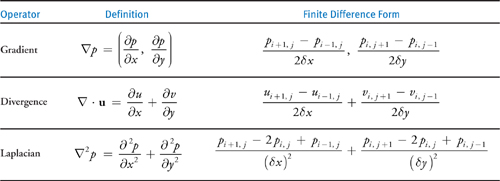
The table above shows how the main differential operators — gradient, divergence, and Laplacian — are approximated on a discrete grid using finite differences. The key idea is that instead of computing exact derivatives, we estimate them using differences between neighboring grid values, which is something a computer can do efficiently.
MAC Grid
To simulate the fluid we first need to encode these concepts on a computer. As we said we will use an Eulerian method, so the most reasonable thing to do is to represent the fluid as a grid of sample points. The most intuitive grid is a collocated grid, which means we represent each quantity at the center of the cell — so at the center of each cell we store the pressure, the velocity, and the density of the fluid. It’s totally fine, and as my first experiment I tried to implement the fluid simulator with this type of grid because it was easy to model in my mind.
The problems with this type of grid in a fluid simulation are multiple, but the most important one is related to the stability of the discretized operators on this grid. There is a well known problem called the “checkerboard problem”. If you look at the table in the previous chapter you will see that in order to calculate for example the gradient operator we need to use a central difference, so we calculate the value at point using its neighbors. But let’s think about the case where our pressure looks like:
+1 -1 +1 -1 +1
-1 +1 -1 +1 -1
+1 -1 +1 -1 +1
If we try to calculate the gradient at point we obtain 0. Instead, in a MAC grid we resolve this problem because we have the pressure at the cell center and the velocities at the cell faces, so to calculate the new velocity we will do instead of and if you try to compute the new result you will see that it will never be 0 even if we have a checkerboard pattern in the pressure field.
Splitting
This is a well known technique in probably every field of science. The concept is simple: we don’t want to solve a complex problem directly in its original form, but instead we want to split it into multiple simpler independent problems. In the fluid simulation, given the Navier-Stokes equations, we can split the computation into 3 different steps: the first one is the advection step, where we calculate a quantity — for example the velocity — at a new time step. Then we have the application of external forces, where we introduce new forces into the simulation. And finally we have a projection step, where we make the vector field incompressible (divergence-free).
Advection
In this step we have to update the values in our static grid based on the previous time step computation. To do it we use a method called “Semi-Lagrangian advection”, which uses the Lagrangian method in an Eulerian world. We use this because it’s one of the most stable methods. This is not a very intuitive step, at least for me, so I encourage you to also take a look at the resources I provided for a better understanding.
What we want to do, as I said, is calculate a quantity — let’s use velocity as an example — at the new time step. In a Lagrangian approach we would simply add to the position of a particle the velocity scaled by the delta time:
We will use this intuition in our simulation but instead of doing a forward pass we will do a backward pass, because we are on a fixed grid and we want to calculate how much our fixed velocity vector changes over time given the velocity of the particle at the previous time step. So we perform this operation instead:
But we have another “problem”: we are on a staggered grid, so our velocity components are all perpendicular to the face of the cell — or if you want, they are normals with respect to the cell face or boundary.
So when we want to compute the vector at a given point on the grid which is not one of the points where we store our velocities, we have to approximate it. To explain it better: if we use the formula above to calculate the position of our particle at the previous time step, we don’t end up perfectly on one of our grid points, so we have to compute the velocity from our known neighboring points.
To do it there are plenty of methods, but the most commonly used one — and the one I used — is bilinear interpolation.
Bilinear interpolation is just linear interpolation applied twice — once along one axis, once along the other. Let’s say we traced back and landed at some point that falls inside a grid cell. We know the velocity values at the four corners of that cell (or in our staggered case, at the four nearest stored velocity samples). We want to estimate the velocity at .
First we do a linear interpolation along the x-axis between the two left corners and between the two right corners, obtaining two intermediate values. Then we interpolate along the y-axis between those two results. In formula form, if and are the fractional offsets of our point inside the cell (both between 0 and 1), and are the four surrounding values, the result is:
It’s nothing more than a weighted average where the weight of each corner is proportional to how close our point is to it — the closer we are to a corner, the more that corner contributes to the final value. Simple but effective.
Projection
This is the step that I found the hardest to understand and also the most interesting one. Remember the second equation we talked about at the beginning?
After the advection step and the application of external forces, our velocity field is almost certainly no longer divergence-free — meaning if you compute at every cell, you will get non-zero values. This makes sense intuitively: we moved velocities around without caring about mass conservation, so some cells are now “gaining” more fluid than they are “losing”, or vice versa. The job of the projection step is to fix this by finding and subtracting the part of the velocity field that is causing the divergence.
This is where the pressure comes in. There is a classical result from vector calculus called the Helmholtz decomposition, which tells us that any vector field can be decomposed into a divergence-free part and a curl-free part (the gradient of a scalar field). In our case we can write:3
where is our “dirty” velocity after advection and forces, is the pressure field we want to find, and is the corrected divergence-free velocity we are after. If we apply the divergence operator to both sides and use the fact that , we get:
This is the Poisson equation for pressure. The right hand side is called the Laplacian of , and on a discrete grid using the same finite difference ideas from the Discretized Operators chapter, it becomes a simple average of the neighboring pressure values minus the center value. For a 2D grid cell :
So the full discrete equation we need to solve for each cell is:
where the divergence of at each cell is computed from the surrounding face velocities on the MAC grid as:
Writing this equation for every interior cell gives us a big linear system , where is a sparse matrix, is the vector of unknown pressures, and is the vector of divergences (scaled by ). The matrix has a very regular structure — each row has at most 5 non-zero entries — so we don’t need to store it explicitly and can use iterative solvers efficiently.
To solve this system I used the Gauss-Seidel method, which is one of the simplest iterative solvers. The idea is straightforward: rearrange the equation for assuming all the neighbors are known, then sweep through the whole grid updating each cell using the most recent values of its neighbors. Repeating this sweep many times converges to the solution. It’s not the fastest method (conjugate gradient or multigrid methods are much faster for large grids), but it’s easy to implement and good enough for a small simulation.
Once we have the pressure field , the final velocity update is just:
which on the MAC grid means updating each face velocity by subtracting the pressure gradient across that face:
And that’s it — after this correction the velocity field satisfies (up to numerical precision) and we can move on to the next time step.
Theory to code
MAC grid
In this section I try to show you how to encode most of the theory I explained in the previous sections on a computer, but I also encourage you to look at the code in my repository while reading the theory and get a feel for it yourself. Let’s start with encoding a MAC (staggered) grid into a computer. As we have seen, we want to store some quantities at cell centers and others at the midpoints of each grid face. In practice they are nothing more than arrays. For the cell-centered grid we want an array of size N×N — I prefer to use flat arrays and index them as if they were a grid, but feel free to use two-dimensional arrays. For the face quantities, since arrays can’t really be treated as geometric objects, we will use separate arrays, but this time with sizes (N+1)×N and N×(N+1), respectively for horizontal and vertical velocities. If you can’t visualize why, try drawing a grid on paper and count the number of face lines along each row and column, then count the number of cells — you will see that it’s exactly as I described.
Advection
I will show pseudocode to advect only the horizontal velocities, but the same process has to be applied to vertical velocities and every other quantity as well.
for each j in rows:
    for each i in columns:
        float vy = vyPrev[i,j]
        float vx = (vxPrev[i,j-1] + vxPrev[i+1,j-1] + vxPrev[i,j] + vxPrev[i+1,j]) / 4
        float x = i - (dt * vx)
        float y = j - (dt * vy)
        clamp the x and y values so you don't try to access out of bound indices

        int i0 = x, i1 = i0 + 1
        int j0 = y, j1 = j0 + 1
        float a = x - i0
        float b = y - j0
        float val = bilinearInterpolation(i0, i1, j0, j1, a, b);
        vxNew[i,j] = val;
    endfor
endfor
Projection
This is probably the most difficult algorithm to implement, because it involves a lot of math and requires a numerical solver as we discussed in the theory section. In the following pseudocode I show you the Gauss-Seidel algorithm to solve the Poisson equation, but feel free to experiment with other more sophisticated algorithms too. As always, feel free to take my code and modify it to experiment. I won’t write out the function to calculate the divergence of a cell, but if you look at the Discretized Operators section, you will notice that it is a straightforward implementation.
p[] stands for the array which contains pressure values

for k < n //where n is the number of iterations needed to converge
    for each j in rows:
        for each i in columns:
        float divergence = calculateDivergence(i,j);
        float sum = p[i-1,j] + p[i+1,j] + p[i,j-1] + p[i,j+1]
        p[i,j] = (sum - divergence) / 4;
        endfor
    endfor
endfor

for each j in rows:
    for each i in columns:
    vx -= (p[i,j] - p[i-1,j]) / dens * dx;
    vy -= (p[i,j] - p[i,j-1]) / dens * dx;
    endfor
endfor
And finally the whole solver loop will be:
solverStep(){
    advectVelocities();
    projection();
    advectDensity();
}
Conclusions and Result
I hope you enjoyed this and I hope you will try to understand it better with other sources that also cover important things like the CFL condition, which I haven’t covered here because I focused only on the parts strictly needed to implement the simulation, and not on the parts that make it as stable as possible. I encourage you to go deeper into the field using whatever resource you want, but I list a bunch of useful resources that I used to build my understanding of the subject in the References section. To wrap it up, I show you a simple video where you can see the solver in action — it’s a simulation of a wind tunnel with a cylindrical object in the middle, and as you can see it starts stable, then at a certain point the fluid starts oscillating, and finally reaches another steady state where we can see the effect of Vortex shedding.4
Lastly there is also a web simulation application where you can play around with it. web-simulation
If you want to explore the full code, you can find it on GitHub. In the code you will also find a simulator written in fragment shaders, which is the one I used to produce the vortex shedding video. I won’t go deeper into GPU programming here, but I want to give you a brief idea of how the port works. Advection and the velocity correction are embarrassingly parallel — each cell is independent, so they map almost directly to shader code. The interesting part is the pressure solver: standard Gauss-Seidel can’t run in parallel because each cell reads freshly updated neighbors. The solution is to switch to Jacobi iteration — instead of reading updated values in-place, each cell reads only from the previous iteration’s buffer and writes to a new one, making every cell fully independent. In practice this is implemented with a ping-pong technique: two textures alternate roles as input and output each iteration, rendered via a full-screen fragment shader pass. I will probably do another post where I go deeper into this topic, but hopefully this gives you a starting point if you want to try it yourself.
References
-
https://pages.cs.wisc.edu/~chaol/data/cs777/stam-stable_fluids.pdf
-
https://matthias-research.github.io/pages/tenMinutePhysics/17-fluidSim.pdf
-
https://graphics.cs.cmu.edu/nsp/course/15-464/Fall09/papers/StamFluidforGames.pdf
-
https://www.cs.ubc.ca/~rbridson/fluidsimulation/fluids_notes.pdf
Footnotes
-
Bridson, R. (2015). Fluid Simulation for Computer Graphics (2nd ed.). CRC Press. ↩
-
https://www.youtube.com/watch?v=TrcCbdWwCBc&list=PLSQl0a2vh4HC5feHa6Rc5c0wbRTx56nF7 ↩
-
https://developer.nvidia.com/gpugems/gpugems/part-vi-beyond-triangles/chapter-38-fast-fluid-dynamics-simulation-gpu ↩ ↩2